
A cost value reconciliation template is a spreadsheet that sets a project's costs against the value earned, to show the margin you are actually making. For a single job it works, and it works well. What breaks it is not the spreadsheet — it is what the spreadsheet cannot do: capture accruals on its own, forecast cost-to-complete without circular logic, or stay current across eight live projects.
What a CVR template gets right#
More than the software vendors selling against it will admit.
A spreadsheet is immediate. Every QS and commercial manager can already read one, which means no onboarding and no licence conversation. It is completely flexible — your service lines, your rates, your way of splitting prelims, all of it bends to how you work rather than how a platform's data model thinks you should. And it costs nothing.
That flexibility is not a consolation prize. It is the reason CVRs live in Excel across most of the UK industry: contract forms vary, valuation practice varies, and every contractor treats uncertified work slightly differently. A template absorbs that. A rigid system frequently does not.
The objection worth conceding: if you run one project and a handful of subcontractors, a template is not a compromise — it is the correct tool, and you should stop reading here.
What actually goes into one#
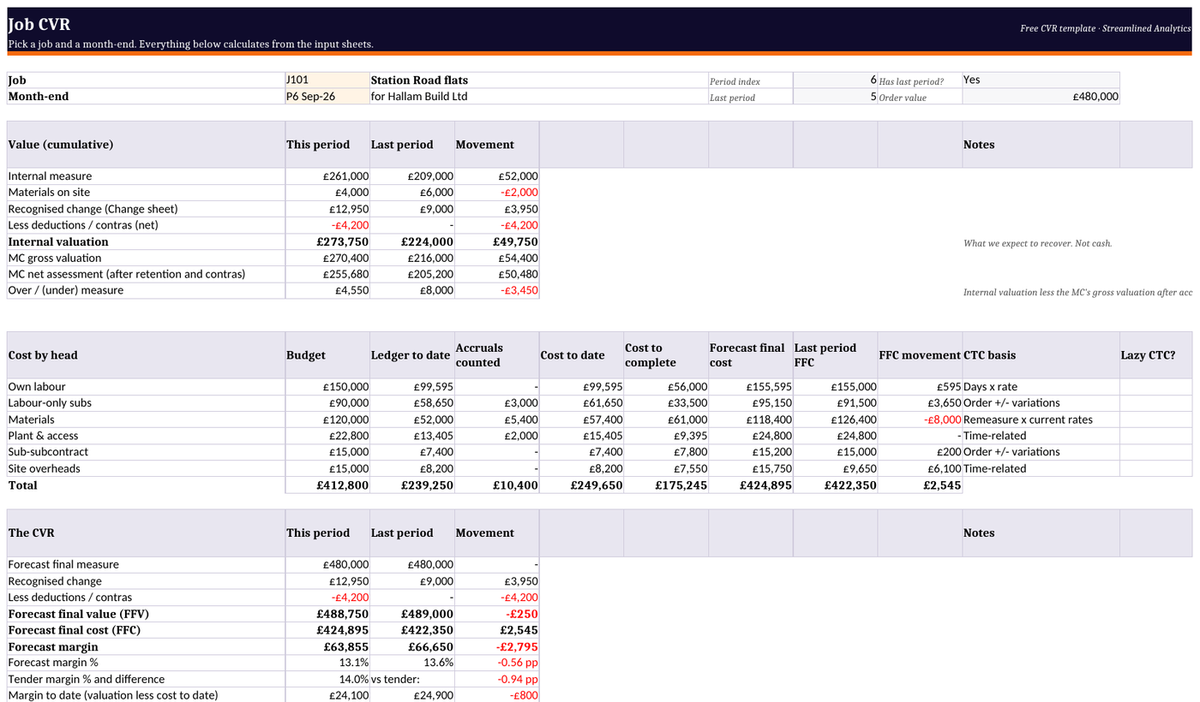
Six blocks, and knowing them is how you judge whether yours is any good:
- Project identification — contract, client, form of contract, period end, preparer.
- Contract value — original sum, agreed variations, pending variations, revised total.
- Cost by category — labour, materials, plant, subcontractors, prelims, overhead, with an accruals line against each.
- Earned value — certified to date, uncertified work, total earned.
- Forecast — cost to complete, forecast final cost, forecast final value.
- Margin — to date (£ and %), forecast at completion, and movement since last period.
Most free templates omit that last one. It is the only column your directors will actually read. A margin of 4% means little; a margin of 4% that was 7% last month is a conversation.

Where it breaks
Accruals#
This is the one that costs money.
Your cost ledger knows what you have been invoiced. It does not know what you have incurred. The concrete that went in last week, against an order that has not hit the ledger, is real cost sitting outside your spreadsheet. Miss it and the maths still balances — it just balances around a number that is too low.
The result is a CVR that flatters you early and corrects violently late. Margin looks healthy for four months, then the invoices land and the job was never making what you thought.
A template can hold accruals, and you can automate the arithmetic. But that formula only works if someone maintains an orders tab and an invoices tab, in the same file, every month, accurately. The spreadsheet is not the weak point. The someone is.
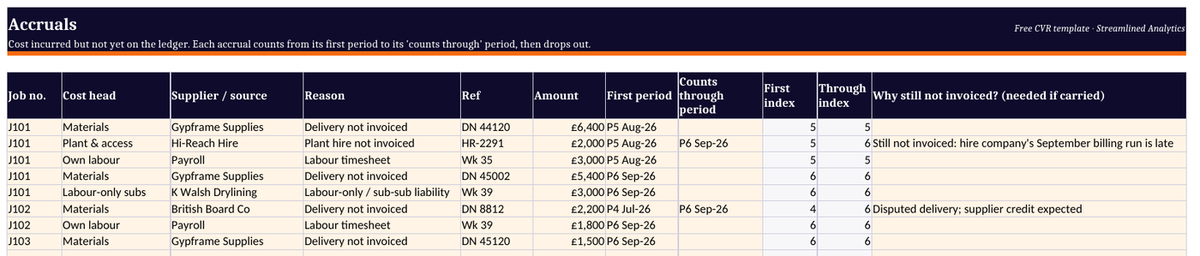
Our free template takes a simpler route: an accruals register where each accrual counts until a month you choose, then drops out on its own, so a cost is never forgotten or counted twice. Get the free CVR template.
Where it breaks
Forecasting cost-to-complete#
The circularity trap, and it is endemic.
If you calculate percent complete from cost, and then forecast remaining cost from percent complete, you have assumed your own answer. A job that is overspending looks further along than it is — so its forecast looks better precisely when it should look worse.
The honest method builds from remaining scope instead. Cost to complete is the remaining measured work, plus what is committed but not yet spent, plus a declared provision for known risk:
- Remaining work at current rates, not tender rates.
- What is on order but unconsumed.
- A named provision for what you know is coming — the weather in the programme, the material price you have been warned about, the subcontractor already noising about a claim.
A template will happily let you do this. It will just as happily let you do the circular version, and it will never tell you which one you did. That is the real gap: a spreadsheet has no opinion about method.
Where it breaks
Variations, version control, and staleness#
Three failures with one root.
Unagreed variations. Instructed work has cost you money. Book the full claimed value and you are recognising profit you have not secured; leave it out and you are showing a loss you are not making. The convention that survives audit is to carry cost in full and value at realistic settlement, with the claimed figure in a separate column so the exposure is visible. A blank template will not prompt you to do that.
Version control and audit. The file lives on someone's laptop. Which copy is current rests on that person remembering. A dragged formula breaks silently and nothing flags it. When someone asks how last quarter's figure was derived, the answer is often that nobody can reconstruct it.
Staleness. By the time the pack is compiled from invoices, emails and accounting exports, it describes a position that has already moved on.
None of these is a flaw in Excel. They are the cost of a manual process — and they scale with the number of reconciliations you run, not your turnover. That is why the same spreadsheet that was fine at two projects is a liability at eight.
What custom software does differently#
Point by point against the three failures above — because a general claim is not worth much here.
Accruals stop depending on someone remembering. If the system already holds your orders and your invoices, the accrual is not a monthly reconstruction; it is a subtraction it does continuously. The commitment is captured when the order is raised, not when someone remembers it existed.
Method gets enforced. A built system can simply refuse the circular forecast — cost-to-complete comes off remaining scope, provisions are a declared line with a name against them. The spreadsheet has no opinion about method; software you specify can hold yours.
The reconciliation stops being a rebuild. When data arrives from the systems you already run — your accounts package, your ordering, your valuations — the monthly CVR becomes a review of a live position rather than an archaeology exercise. The QS's judgement goes into the provisions, not the transcription.
The distinction worth drawing: this is not an argument for a platform. Off-the-shelf construction software solves these by making you adopt its model of a contract — which is exactly why so many firms export back into Excel to get the real view. Custom means your commercial logic, your rates, your treatment of uncertified work, in a system you own rather than rent.
We have built this shape of commercial tooling for project-based construction businesses — bespoke quoting and cost tracking for firms like GS Foam Concrete, where the pricing was too specific for anything off the shelf. Over 300 quotes have gone through that system now, and the difference from a folder of spreadsheets is not the arithmetic — it is that every one of them is stored in one place, reviewable in seconds, and feeding the dashboards the business actually runs on, rather than being three hundred files on a shared drive that nobody can aggregate.
When a template is still the right answer#
Frequently, and it is worth being blunt about it.
One project. Few subcontractors. A QS who owns the file and has time to maintain it. Stable rates. In that situation a template is faster, cheaper and better than anything you could commission, and replacing it would be a waste of money.
The test is not turnover and it is not headcount. It is this: is your reconciliation still telling you something you can act on? If the CVR arrives describing a position you can still change, the spreadsheet is working. If it arrives as a record of what already happened, you are paying to produce it and getting none of the benefit — and that is the point at which the conversation is worth having.
If that describes you, start with our free CVR template for Excel. Nothing is locked, and every formula is explained.
If your monthly CVR has become a rebuild rather than a review, it is worth a short call to find where the time actually goes — usually it is the chasing, not the maths. Book a short call and we will go through it on your numbers. If it is worth building, we then make a free prototype: a working first version on one of your real jobs. We build 4 a month.
FAQs
What is cost value reconciliation?
Comparing what a project has cost against the value of work earned, to establish margin to date and forecast margin at completion. It is the UK industry's version of earned value analysis.
What goes into a CVR report?
Contract value including variations; cost by category including accruals; earned value both certified and uncertified; cost-to-complete; and margin to date and at completion.
Can you do a CVR in Excel?
Yes. For a single project it is often the best answer. It strains when you are reconciling several jobs monthly and rebuilding the pack by hand each time.
How often should a CVR be done?
Monthly — after the valuation is agreed and costs are captured, before the next period's forecasts lock.
What is the difference between a CVR and a valuation?
A valuation is what you claim from the client. A CVR is what you are actually making. A job can be well-valued and unprofitable simultaneously — exposing that is the entire point.
Why does a CVR overstate margin?
Almost always missing accruals: costs incurred but not yet invoiced. The job looks profitable until the invoices arrive.
Keep reading
What is cost value reconciliation (CVR)? A guide for UK contractors
Cost value reconciliation (CVR) compares what a construction job has cost with the value of the work done, to show the margin you are really making and where it is heading. How it works, step by step, with a worked example.
6 October 2026 ReadConstruction reporting software: turn project spreadsheets into live dashboards
The monthly board pack shouldn't take a day to build by hand. Here's how bespoke construction reporting turns your project spreadsheets into live dashboards.
14 July 2026 ReadMarkup vs margin for contractors: the formulas, a quick conversion table, and how to stop getting it wrong on quotes
Markup is profit as a share of cost, and margin is profit as a share of the price. Here are the formulas, a conversion table and the Excel formulas, plus why the real margin leaks happen on the quote rather than in the arithmetic.
6 October 2026 Read